TwistedBrush Pro Studio

TwistedBrush Pro Studio
License:
Trial version
Language:
English
Developer:
OS:
Win95/98/98SE/Me/2000/NT/XP/Vista/7
Updated:
See detailed info

Softonic review

Amber Sass

“Draw your own works of art”

by Amber Sass about TwistedBrush Pro Studio

TwistedBrush Pro Studio is a complete drawing tool for PC users.

If you want to display your drawings online, you have two options: either scan hard copies of your drawings or draw them directly on your computer. TwistedBrush Pro Studio lets you do the latter in impressive fashion once you learn how to use it.

If you're envisioning designing sharp looking graphics for a new website, turn back now. TwistedBrush Pro Studio and its free version TwistedBrush Open Studio has not been developed to create clean crisp graphics. It will frustrate you unless you use it for what it was designed for, which is drawing and art. As a result, one of the best and most effective ways to use TwistedBrush Pro Studio is with a pen and a drawing tablet.

When TwistedBrush Pro Studio starts, a quick-start guide designed to gently introduce you to the features will pop up. While this has the potential to be useful, some users might be frustrated that the guide is largely made up of screenshots with information bubbles. If you have difficulty understanding a concept, there're no links to click on to obtain further information.

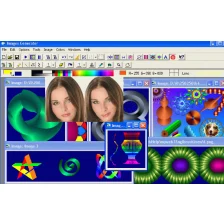
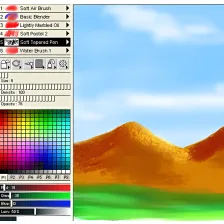
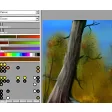
Thankfully, TwistedBrush Pro Studio is relatively easy to navigate through. A lot of effort was put into making it a realistic substitute for actual painting, and when you start working with the various brushes you'll immediately see that they interact well with the colors to create a convincing portrait. Undoubtedly TwistedBrush Pro Studio's greatest strength is the vast selection of brush types and styles that are available to use. From simple fine pens, to wet oil brushes and progressive 3D designs, users have a lot to choose from in TwistedBrush Pro Studio. The beauty of each brush is that it can be used quickly and easily, with stunning results.

Users will also find support for all the major image file formats in TwistedBrush Pro Studio, including TIFF, PSD, JPG, GIF, and PNG. Unfortunately, it seems TwistedBrush Pro Studio doesn't have a select tool. After using Adobe Photoshop for so long, many users will view this as key tool in any imaging software. Alternatively it could be the very omission of the select tool that sets TwistedBrush Pro Studio apart, with the production process being more of an evolution than a construction.

TwistedBrush Pro Studio is a quality painting and drawing tool that works best for users who have a drawing tablet handy.

Pros
  • Great selection of brushes
  • Easy to apply effects
  • Masking available
  • Support for scripts
Cons
  • Unintuitive interface
  • No selection tool
  • Draw tablet essential
Download TwistedBrush Pro Studio 18.14

TwistedBrush Pro Studio is virus free

We have analyzed the latest version of TwistedBrush Pro Studio with 30 antivirus engines and it is virus free. See analysis results.

TESTED VIRUS FREE - Softonic GUARANTEED

Developer's description

Most graphics programs offer at most 32 bits of color resolution. TwistedBrush represents all image data internally at a full 64 bits of color resolution. This allows for super smooth color mixing and alpha blending. TwistedBrush has over 1500 diffferent brushes included. These range from very simple color dots to realistic representations of natural artist tools to very wild brushes.

Over 50 filters can be used to quickly alter and adjust your image. The includes basic photographic filters that adjust brightness and contrast or equalize the colors, artist filters that allow you to mimic a oil painting with a click of the mouse, blurring filters, noise filters, noise generation filters, distorting filters, sharpening filters etc.

With masks part of an image can be protected from changes. This works just like traditional artist masks or friskets. There are numerous ways to create and edit masks, they can be painted on with masking brushes, added to with special masking tools for rectangles and ellipses, the masking magic wand can be used to mask area of similar color or you can even convert and existing image to a mask.

Review and rate TwistedBrush Pro Studio

Your avatar

Your opinion is important.
Help other users - be the first to review this program.

Review
  1. Maximum: 75 characters

  2. See example

Pros and Cons
Rate
  1. What rating would you give TwistedBrush Pro Studio?

    You need to fill in all fields

    • Usability:

      Not rated
    • Stability:

      Not rated
    • Installation:

      Not rated
    • Functionality:

      Not rated
    • Appearance:

      Not rated
    • Overall rating:

      Not rated
  2. Don't worry, we won't make your email address public.

You're not allowed to share serial numbers, cracks, etc. or link to pages that contain them. If you do, your user account will be deleted, your IP address logged and legal action will be taken.

Get started - just ask a question!

Write a title for your question.

Alternativesto TwistedBrush Pro Studio

Compare with TwistedBrush Pro Studio
Download rank: Design

16 of 37

Softonic rating:
  • Very good
  • 8/10
User rating: (7 ratings)
  • Not bad
  • 5/10
Your rating:
Your rating
  • 0

Review and rate this program

Top Downloads: Design

  • United States
  • Global

  1. A reference in the creation of vector graphics

Reviews of TwistedBrush Pro Studio in other languages